For brokers, PEOs and general agencies

Every employee in your book gets a benefits expert who never goes home.

One link per group. Employees get answers from their actual plans — cost per paycheck, what's covered, how to enroll — in any language, at any hour. Every enrollment request lands with your advisor, not your voicemail.

Try the live demo Start a free 60-day pilot

Nothing to download or log into. Works with any carrier and any ben-admin system. A group is live in under a day.

Northwind OUTFITTERS
ENES
Ask about your benefitsCoverage, cost per paycheck, enrollment, claims
Which medical plan is right for me?What will medical cost me per paycheck?How do I enroll?
Ask about your benefits…

Sample group. Rates and rules come from the group's plan documents, never from the model's memory.

Built inside a 400-group benefits practiceDesigned by people who answer these questions for a living, in Denver.
Grounded in the plan documentsAnswers cite what was uploaded. When something isn't there, it says so and hands off to the advisor.
No SSNs or medical details requiredEmployees don't log in. Questions are logged by group, without names.
Live for a group in under a dayUpload the enrollment guide and SBCs. We read them and build the draft.
Who built this

Built inside a real benefits practice

We built AgencyNodes inside our own 400-group Denver benefits practice because we were tired of the same after-hours questions — deductibles, per-paycheck costs, how to add a dependent, what's covered.

Our team still handles the complex cases. The assistant handles the rest, in the employee's language, grounded in the actual plan documents you upload. Every enrollment or callback request still lands with the advisor, not a voicemail.

It's the tool we wanted for our own book.

DC
Dan CoryFounder · runs a 400-group benefits practice in Denver

Your groups are yours. Every agency's data is isolated; nobody at our practice can see your groups, employees or questions.
What every group gets

Three things from one set of plan documents

Upload a group's enrollment guide, SBCs and rate sheets once. The assistant, the printed guide and the document library all come from the same file — edit a rate and all three update.

01 · The assistant

A benefits expert on every employee's phone

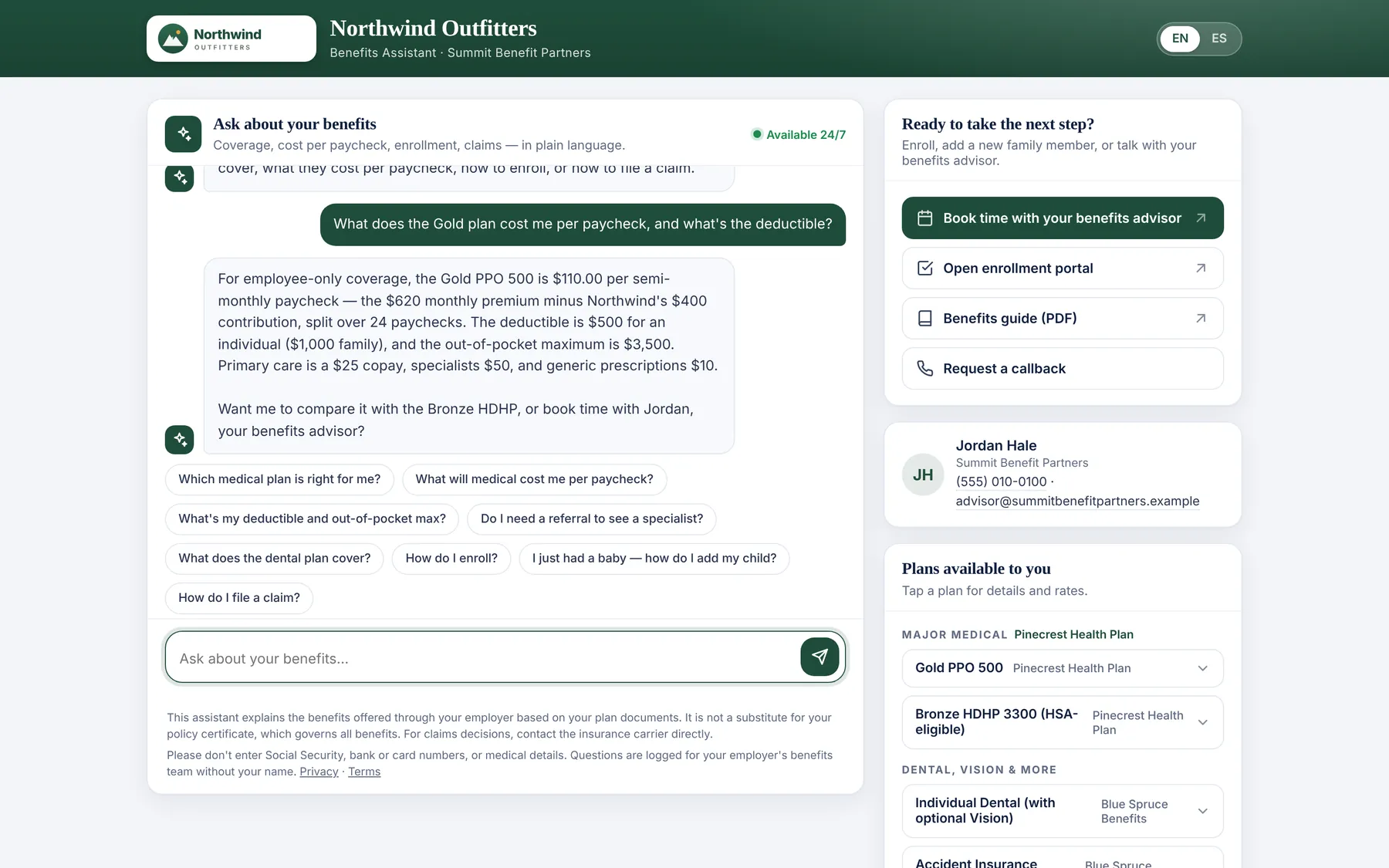
Plain-language answers about medical, dental, vision and voluntary plans, with the math done for their paycheck. It answers in whatever language the employee writes in, and when someone wants to enroll or add a dependent, it books them with your advisor.

  • Per-paycheck cost from age or tier rates, the employer contribution and the group's payroll cycle
  • Interface in English and Spanish; answers in Vietnamese, Tagalog, Russian, Chinese and more
  • Branded to your agency, with your advisor's contact card and booking link on every answer
  • Designed not to recommend a plan, decide a claim or confirm coverage for a diagnosis — and you review every group before it goes live
The assistant on desktop: a conversation beside the group's plans, documents and advisor card
Answers in 2–4 seconds
Employees get plan-specific answers in seconds — cost per paycheck, deductibles, what's covered — with a source line pointing to the document you uploaded.
02 · The benefits guide

A branded, print-ready guide — without a designer

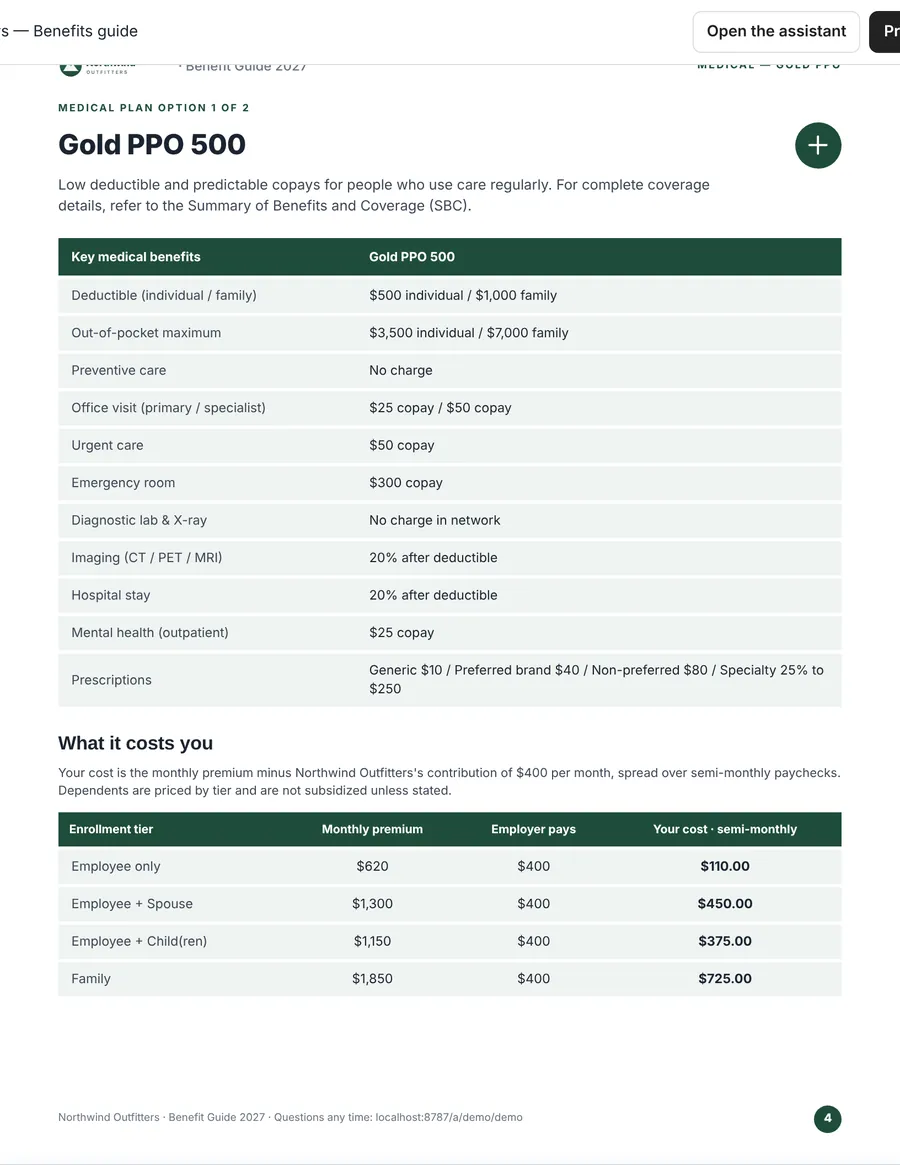
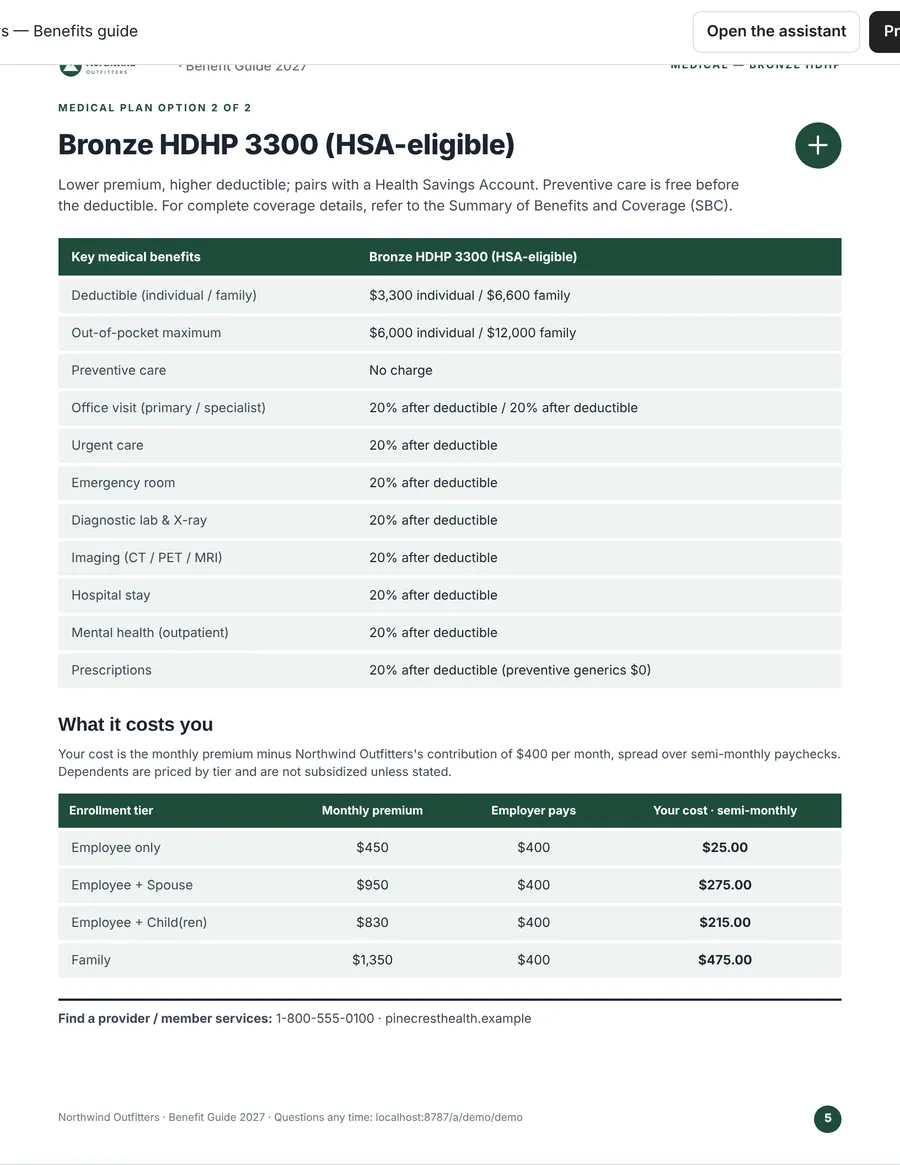
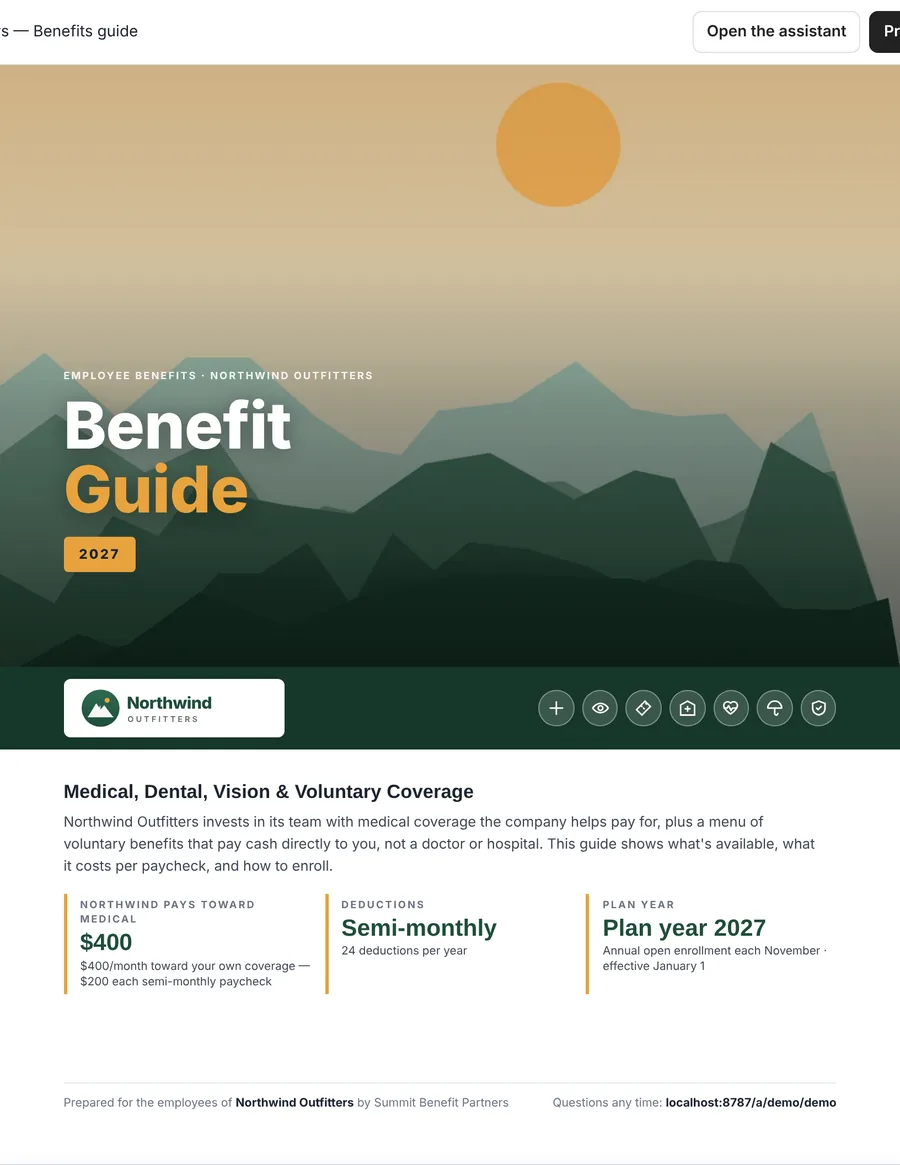
The same file produces a letter-size benefits guide in the employer's own colors and logo: a cover with the employer contribution, one clean page per medical plan, an age or tier cost table, every voluntary line with per-paycheck costs, enrollment steps and carrier contacts. The QR code on the cover opens the assistant.

  • We pull the employer's logo, colors and a hero image from their website; you can override any of it
  • Print from the browser or save as PDF. Reprints itself when the group renews
  • Your agency name and advisor on every page
Benefits guide cover in the employer's branding A medical plan page from the guide The medical cost page from the guide
A print-ready benefits guide is generated automatically in the employer's colors and logo, with a QR code that opens the assistant.
03 · Your console

See what every group is asking before they call

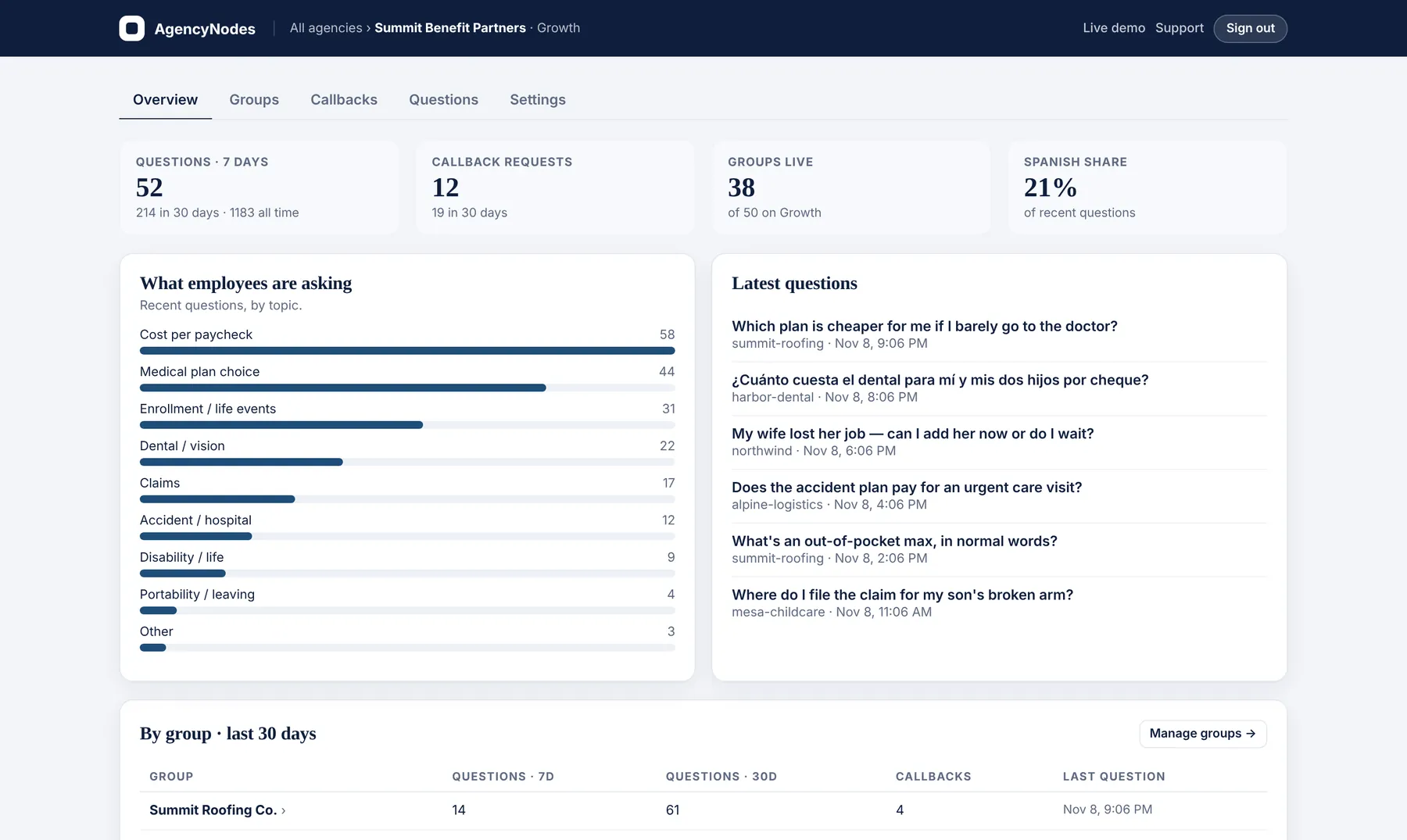
Questions are logged by group and topic, without names. You see which groups are confused about plan choice before open enrollment, where the Spanish-speaking workforce is, and which groups keep asking about disability or life — which is a cross-sell conversation waiting to happen.

  • Callback and enrollment requests by email, or straight into your CRM by webhook
  • Drag in new documents at renewal; the plan data updates from them
  • Magic-link sign-in for your account managers — no passwords to manage
The agency console overview: questions this week, callback requests, topics and activity by group
Sample data
See what employees are asking by group and topic (no names), spot confusion early, and get enrollment or callback requests routed to the right advisor.
How it works

Live for a group in three steps

No integration and no IT project on the employer's side. The first groups usually take an afternoon.

STEP 1

Drop in the documents

Enrollment guide, SBCs, rate sheets, brochures. We read them, build the group's plan data and flag anything missing. You review and press save.

STEP 2

Share one link

Print the guide (its QR code opens the assistant) and drop the link into Employee Navigator, Ease, Rippling or the new-hire email. It opens on any phone; nobody creates an account.

STEP 3

Watch the requests come in

Enroll, add a dependent, review coverage, help with a claim — each lands in your inbox or CRM with the group, name and phone. Every question is logged by topic.

Brokers

Keep the relationship and lose the 9 pm texts. Employees get a clear, plan-grounded answer at any hour; your team keeps the conversations that need a person.

PEOs

Each worksite employer gets its own plans, contribution and payroll cycle, so the per-paycheck math is right for every client. Requests route to your service team by webhook.

General agencies

Hand every downline broker an employee-facing assistant for the groups written through you, white-labeled to the broker. Multiple brokers under one account on Scale.

What it's worth

Run it with your own numbers

An illustration of staff time, not a promise of cash savings — adjust every assumption, including how much the assistant handles. It doesn't count premium written from the enrollment requests it routes to you.

67 hrs

of staff time per month, worth about $2,554 in capacity — $1,555 after the Growth subscription.

Illustrative gross staff-capacity value. The remaining questions still reach a person, and loading and reviewing groups takes time of its own. Measure actual handling during your pilot before counting it as savings.
Why AgencyNodes

Why agencies choose it

  • No employee logins or sensitive dataOne link. No SSNs, no passwords, no health details.
  • Any carrier, any ben-admin systemIt's a link, not an integration — Employee Navigator, Ease, Rippling, paper.
  • Grounded in their plan documentsCites what was uploaded and flags what's missing instead of guessing.
  • Any languageEnglish, Spanish, Vietnamese, Tagalog, Russian, Chinese and more.
  • Branded printable guide that updates itselfIn the employer's colors and logo, with a QR code to the assistant.
  • An agency consoleQuestion trends by group and topic, plus routing to your advisors.
  • Built by practitionersBy people who still run a benefits book and answer these questions.
  • Month to month, free 60-day pilotWalk away if it doesn't work.
How it compares

Against the ways agencies handle this today

Named vendors change monthly; the categories don't. This is where AgencyNodes sits.

AgencyNodesAssistant inside a ben-admin platformGeneric document chatbotOutsourced call centerYour inbox
Works with any carrier and any ben-admin systemYes — it's a linkOnly that platform's groupsYesYesYes
Employee needs no loginYesPlatform loginVariesPhone—
Per-paycheck math from the group's payroll cycle and contributionBuilt inSometimesNoIf trainedManual
Branded printable guide from the same dataYes, with QRNoNoNoDesigner
Any languageYesUsually EN/ESYesLimitedNo
Routes enrollment and callback requests to your advisorYesTo the platform workflowNoTo their queueThat's the problem
White-label to the agencyYesPlatform brandVariesNo—
Setup per groupUpload documents; under a dayPlatform buildUpload, then prompt-tuneTraining and scriptsNone
Typical cost$199–$999 / mo per agencyBundled, platform-widePer seat / per messagePer call or per employeeStaff time after hours
Pricing

Priced by the book, not the headcount

Per agency, PEO or GA. Unlimited employees and conversations on every plan. Month to month, cancel any time.

Start free: five groups for 60 days.No card. We load your first five groups for you. Pick a plan when you're ready, or walk away.
Request a pilot
Starter
$199/ month
Up to 15 groups
  • Everything in the core set below
  • Self-serve group loading from documents
  • Callback requests by email
  • CRM / ticketing webhook
  • Custom domain
  • Multiple brokers under one account
Start with a pilot
Most agencies
Growth
$499/ month
Up to 50 groups
  • Everything in the core set below
  • Priority group loading — send us the documents
  • Callback requests by email
  • CRM / ticketing webhook
  • Custom domain
  • Multiple brokers under one account
Start with a pilot
Scale
$999/ month
Up to 150 groups
  • Everything in the core set below
  • Priority group loading
  • Callback requests by email
  • CRM / ticketing webhook
  • Custom domain
  • Multiple brokers / advisors under one account
Start with a pilot
Core set, on every plan
  • Assistant in any language, all lines of coverage
  • Branded benefits guide per group
  • Plan documents hosted per group
  • Your branding and advisor routing
  • Question log by group and topic
  • Optional voluntary-benefit quote requests

Self-serve checkout opens soon; every account starts with the free pilot and we set up billing with you at the end of it. More than 150 groups, or an enrollment firm? hello@agencynodes.com

Security & E&O

Built to stay on the right side of the line

It explains and routes. It never adjudicates a claim, confirms coverage for a diagnosis, recommends a plan, or gives medical, legal or tax advice — and it says so on every page.

No sensitive data required

No logins, and it never asks for Social Security numbers, bank details or medical history. Employees are told not to enter them. A callback request is only what they type: name, phone, reason.

“Your certificate governs”

Every page carries it. The assistant's instructions forbid plan recommendations, claim decisions and coverage determinations. Like any AI, it can still make a mistake — which is why you review each group's data before launch and can correct it any time.

A written record of every answer

Every question and answer is logged by group, without names, and kept for 180 days. You can see exactly what was said, and export it.

Isolated per agency, served from the edge

Each agency's groups and documents are stored separately and served over HTTPS from Cloudflare's network. Plan documents are never used to train models.

FAQ

Questions brokers ask us

Does it give advice? What's my E&O exposure?

It explains what the plan says and routes people to the right place. It is instructed not to recommend a plan, decide claims, or confirm coverage for a specific condition, and every page carries “your certificate governs” language. It is still AI: it can misread or misstate something, so you review each group's extracted data before it goes live, and every question and answer is logged by group so you can see and correct what was said. Talk to your E&O carrier about how an AI communication tool fits your coverage; we'll share our documentation.

Where does the plan information come from?

From the documents you upload: the enrollment guide, SBCs, rate sheets and the employer's contribution rules. We read them into structured plan data per group, which you review before it goes live. The assistant can only answer from that; if something isn't loaded, it says so and offers the advisor rather than guessing.

Which carriers and ben-admin systems does it work with?

Any. It's a link, not an integration — it works alongside Employee Navigator, Ease, Rippling, Gusto or a paper guide, and with any medical, dental, vision or voluntary carrier.

What if a group doesn't offer voluntary benefits yet?

Load the core plans and mark the group “no voluntary benefits yet.” From the console you can request no-cost quotes for accident, hospital indemnity, critical illness and disability. Quotes are arranged by the Cory District, the Denver benefits practice run by AgencyNodes' founder, which is appointed with voluntary-benefit carriers including Colonial Life. You remain the agent of record with your client, there is no charge to your agency for the quotes, and the practice is compensated by the carrier only if a case is placed. Nobody at the practice can see your groups' data, and the feature is entirely optional. You get options to present; nothing is shown to employees without you, and the feature is entirely optional.

What happens to the employee's data?

Employees don't log in and aren't asked for Social Security numbers, bank details or health information. Questions are logged by group without names. Callback requests contain only what the employee types in: name, phone and reason. Plan documents stay in your agency's account and are never used to train models.

How fast can a group go live?

Once we have the documents, a group typically takes under an hour to load and check. On the pilot we load your first five.

Can my brokers or account managers have their own logins?

Yes. Add their email in Settings and they sign in with a magic link — no passwords. On the Scale plan a GA can run multiple broker agencies under one account.

Can it be on our own domain?

On Scale, yes: benefits.youragency.com instead of ours. On every plan the pages carry your name, logo and colors.

Start with five groups, free for 60 days.

We load them from your enrollment guides and SBCs. Your console opens within one business day, with the first group live when you sign in. Measure the actual questions handled and hours saved in the console. Walk away if it doesn't work — no card, nothing to cancel.

Prefer email? hello@agencynodes.com

Request your pilot

Four fields. No card. We reply within one business day.

Optional details — phone, role, ben-admin platform, notes

By requesting a pilot you agree to our Terms and Privacy Policy.

✓Request received.

Check your inbox — a confirmation is on its way, and you'll have console access within one business day.